
Steps
Scraping Tweets
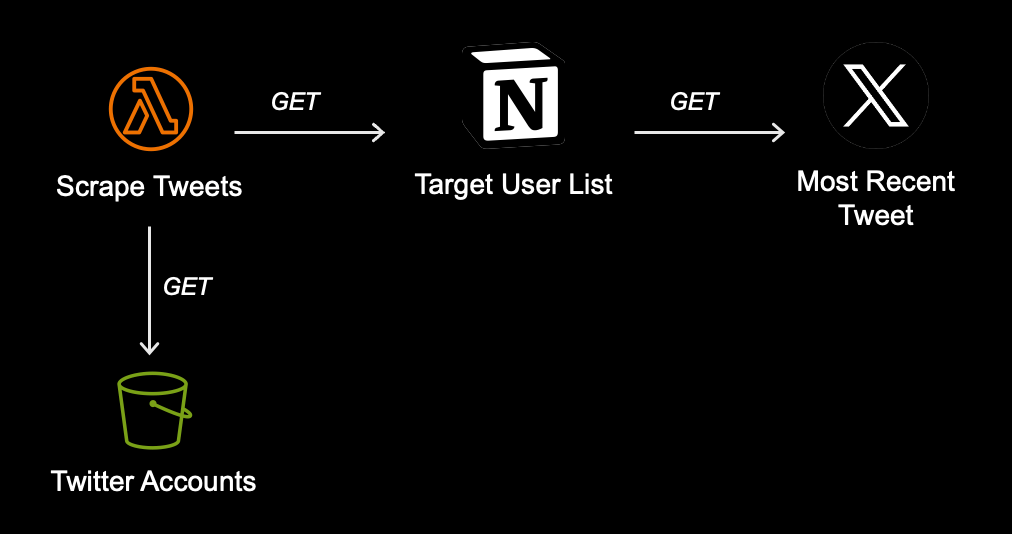
We use a third-party library to retrieve the most recent non-pinned tweet from a list of target users, focusing solely on the tweet content and excluding user replies. This retrieval process distinguishes between original tweets, retweets, and quote tweets. For quote tweets, it also captures the original tweet and any quoted content, creating a complete conversation thread.
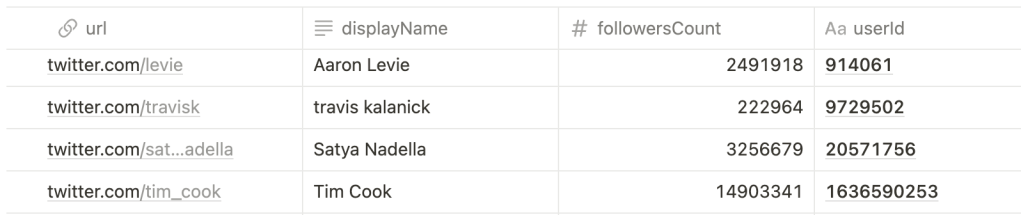
A Notion table serves as a list of target users for retrieving tweets.
Processing an Individual Tweet
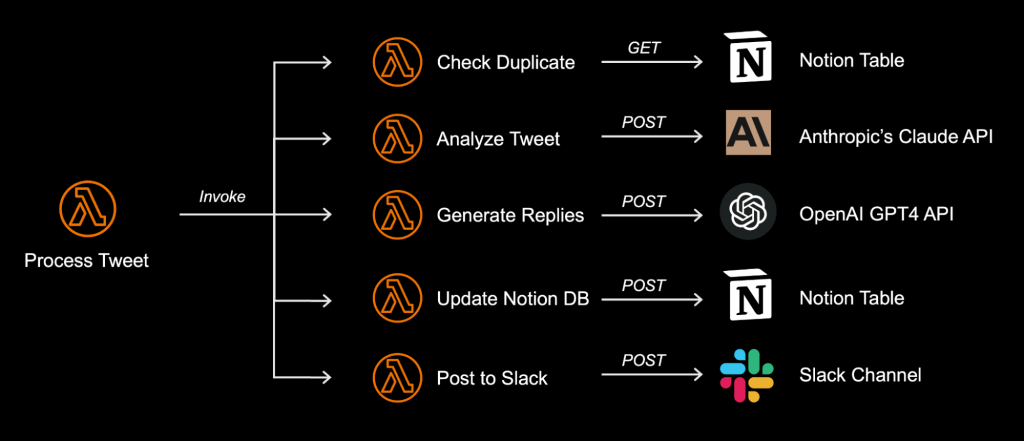
Tweet processing follows a specific order:
- Duplicate Check:
First, the system checks if the tweet has already been processed to prevent redundant work and ensure each tweet is handled only once. - Tweet Analysis:
Next, the tweet is analyzed to identify specific characteristics of the content. - Generate Draft Replies:
Based on the analysis, the system automatically generates draft replies tailored to the specific tweet. - Post to Notion Database:
The results, including the processed tweet and draft replies, are then saved to the Notion table, serving as a record and providing additional context. - Post to Slack:
Finally, the processed tweet and draft reply are posted to a designated Slack channel, allowing users to react to the post and trigger the automated tweet reply based on their chosen reaction.
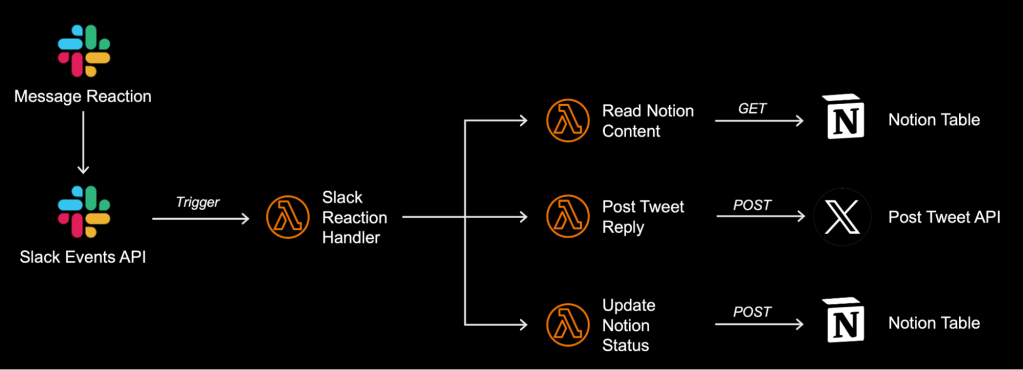
Automating Tweet Replies Based on Slack Reactions
- Read Slack Reaction:
By subscribing to webhooks, the system can detect any reaction to posts in the designated channel. It then reads the reaction type and determines the appropriate reply to post. - Read Notion Content:
The system retrieves relevant information from the Notion table, which serves as the data source for this automation. - Post to Twitter:
The system automatically posts the generated tweet reply to the designated Twitter account. - Update Notion Status:
Finally, the system updates the Notion table, marking the processed tweet as “posted”.
Logs
Tweet Analysis Using Claude AI
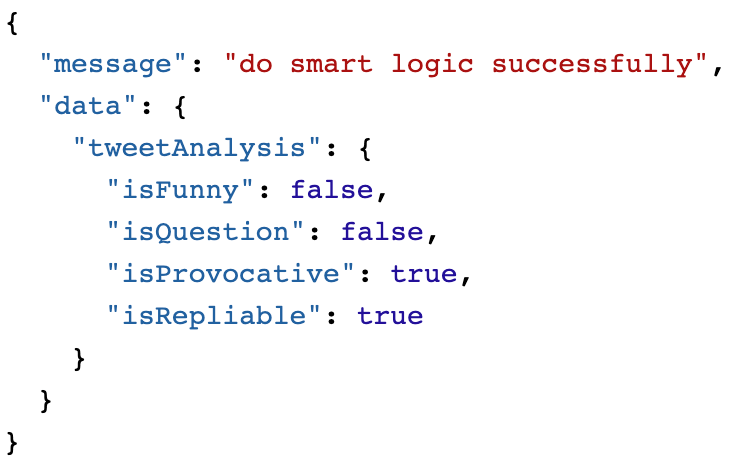
Applying smart logic to a tweet for simple analysis
https://github.com/anthropics/anthropic-sdk-typescript?tab=readme-ov-file
The expected result includes four parameters: isFunny, isQuestion, isProvocative, and isRepliable.
Draft Reply Generation Using OpenAI GPT
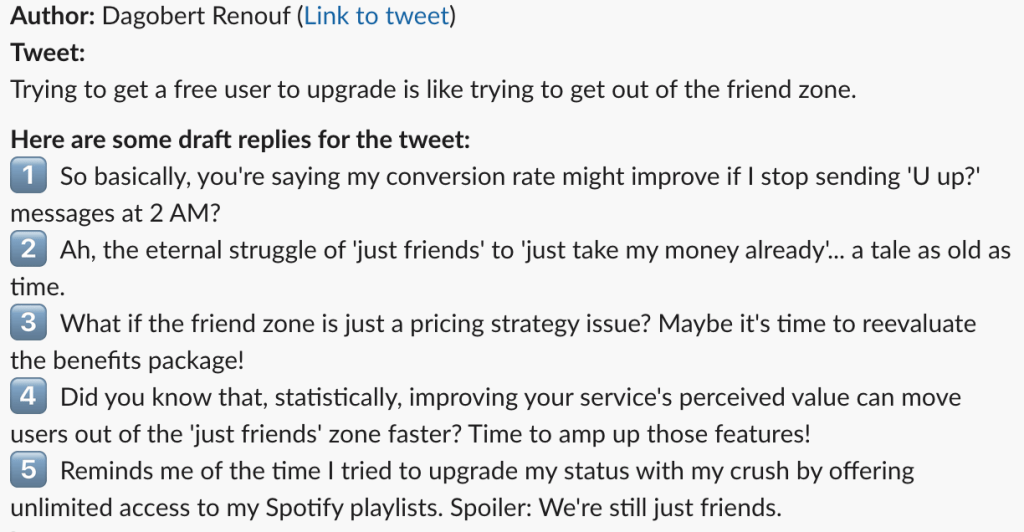
First, we prompt GPT to analyze about 10 of someone’s past tweets to understand their writing style, including word choice, sentence structure, and overall tone. This helps us grasp how they prefer to communicate. Then, based on what we’ve learned about their style and the nature of the tweet from our previous analysis (funny, question, etc.), we ask GPT to generate five different reply options: funny, relatable, challenging, informative, and personal story.
https://platform.openai.com/docs/guides/text-generation/chat-completions-api
Post to the Notion Database
A Notion table is used as the database for processed tweets.
https://developers.notion.com/docs/working-with-databases
Post to Slack
We use the Node Slack SDK to post messages with processed tweets, allowing users to select which draft replies to post to Twitter.
https://slack.dev/node-slack-sdk/web-api
This is the initial design for prototyping.
Improving the Slack Post User Experience
To enhance Slack messages, we use Block Kit, a powerful Slack framework that enables the creation of rich and interactive messages to improve user experience.
https://api.slack.com/block-kit/building
This is the final enhanced design, featuring a shortcut link to the tweet’s database entry, allowing users to edit the draft reply before posting.
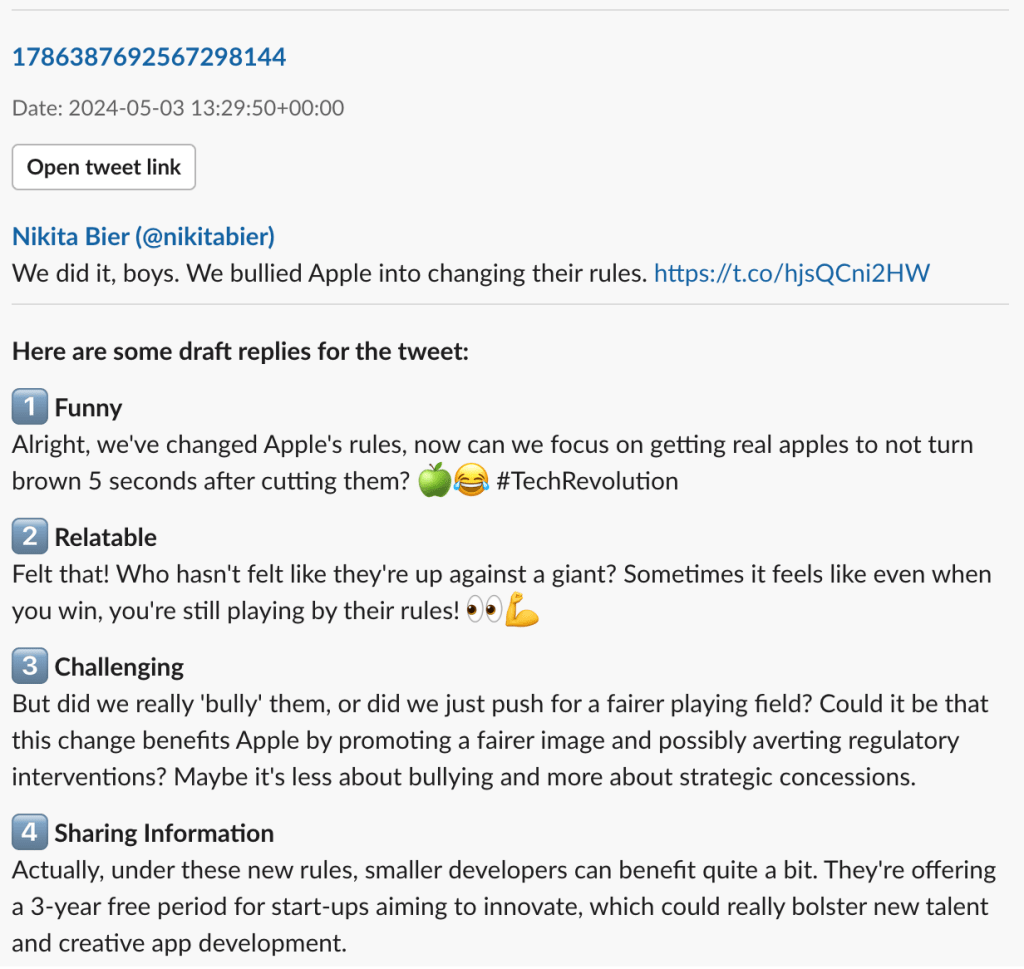
Note: The generated replies relate to the image in the tweet—a screenshot from the Apple Developer website announcing that small developers will now receive a three-year free on-ramp to help them create innovative apps.
Read Slack Reactions
The system uses webhooks from the Slack Events API as a notification
mechanism, enabling Slack to send real-time updates about user
interactions to our system. https://api.slack.com/apis/connections/events-api
In this scenario, we set up a webhook to monitor reactions to messages in a designated Slack channel. When a user reacts to a post in that channel, the webhook triggers our system to post the selected draft reply to the original tweet.
Post to Twitter
Posting to Twitter using X API v2. The free tier allows up to 50 tweet posts within a 24-hour window and 1,500 tweets within 30 days.
https://developer.twitter.com/en/docs/twitter-api/tweets/manage-tweets/api-reference/post-tweets
Schedule a Lambda Function Using EventBridge
Create a schedule to automatically invoke the Lambda function to scrape tweets at specified times.
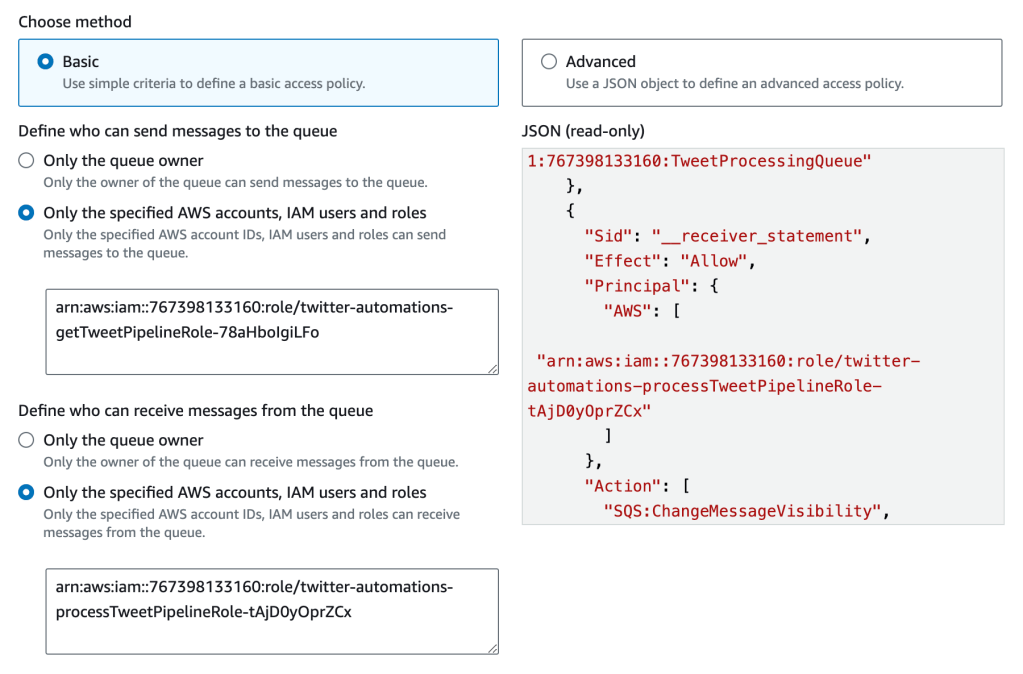
Using SQS to Process Each Tweet
The scheduled Lambda function for scraping tweets sends each tweet event as a message to the queue. These messages are then processed one by one, with up to five tweets being processed in parallel.
Links
Send SQS event
https://docs.aws.amazon.com/sdk-for-javascript/v2/developer-guide/sqs-examples-send-receive-messages.html
Consume SQS events with lambda
https://docs.aws.amazon.com/lambda/latest/dg/with-sqs-example.html
Enhancing Context with an Image
GPT can be prompted with the URL of the first image attached to a tweet, allowing the model to include visual information for more nuanced replies. However, it’s important to note that processing images uses about 700 more tokens than text-only prompts. To prompt with an image, simply add the image_url to the prompt content.
https://platform.openai.com/docs/guides/vision
Access Quoted Tweet
LLM benefit from richer contexts, including the conversation thread leading up to a tweet. This helps the model understand the discussion’s flow, identify key points, and generate more relevant replies. To balance context with efficiency, we limit the conversation history to four tweets. This prevents overloading the LLM with irrelevant information. Additionally, since our system replies as a third party, we ensure the LLM’s responses are tailored from an external perspective, avoiding overly familiar language or assumptions about prior discussion knowledge.
Ignore Personal Story Reply
We’ve found that personal story replies require more context and have temporarily ignored them due to their lower quality compared to other types of replies.
Avoid Fancy Words
Words like ‘delve’ occasionally appear, but they aren’t natural or easy to understand. Include a sentence in the reply generation prompt to avoid such words.
Diagrams
Scheduled Tweet Processing
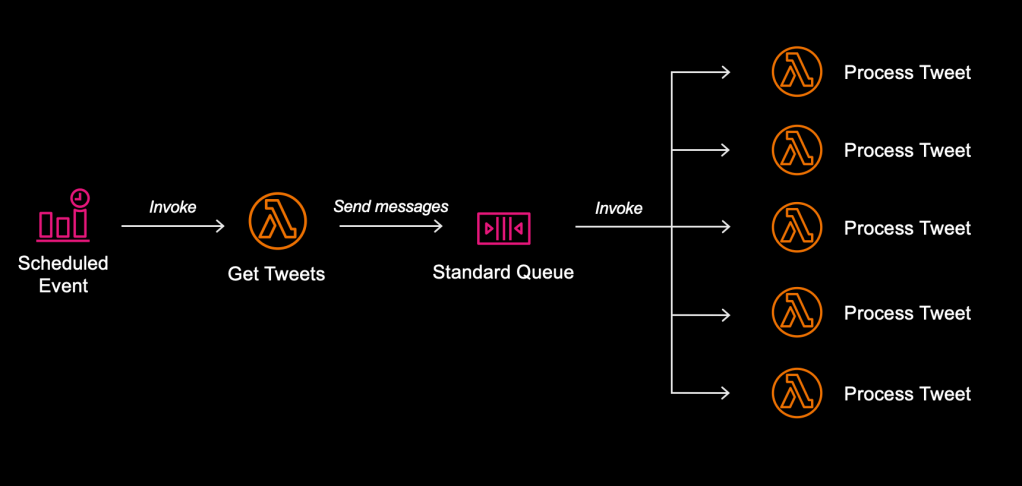
- The Amazon EventBridge Scheduler triggers the ‘Get Tweets’ Lambda function.
- ‘Get Tweets’ retrieves recent tweets from users and creates events for each tweet, which are then sent as messages to an SQS queue.
- The queue triggers the ‘Process Tweet’ function when new messages arrive.
Get Tweets Pipeline
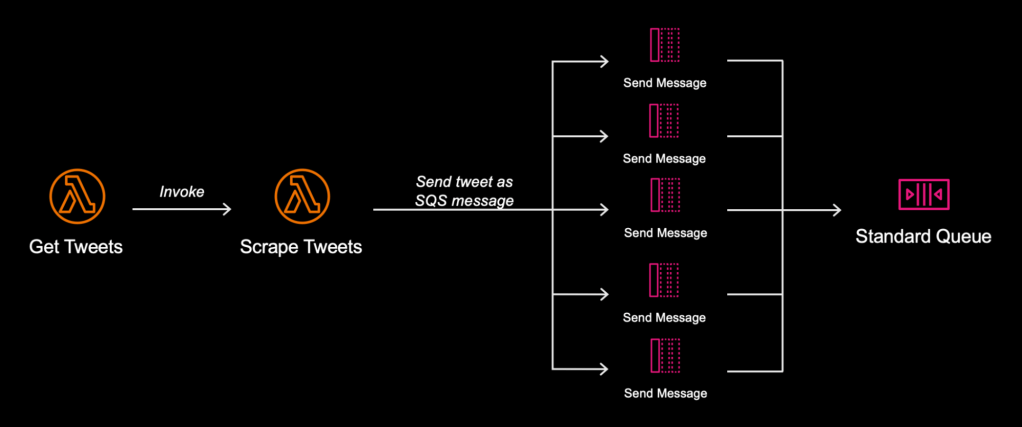
- The workflow begins with the ‘Scrape Tweets’ Lambda function, which retrieves the latest tweet from each user in the target list database.
- Each retrieved tweet is then converted into an event message and published to a standard SQS queue.
Scrape Tweets
Process Tweet Pipeline
Automating Tweet Reply

 TKA Dev Blog